> For the complete documentation index, see [llms.txt](https://docs.pett.ai/llms.txt). Markdown versions of documentation pages are available by appending `.md` to page URLs; this page is available as [Markdown](https://docs.pett.ai/tokenomics/deposits-and-withdrawals.md).
# Deposits & Withdrawals
## Deposit Rewards
In order to increase your in-game purchasing power, you can buy $AIP tokens on Aerodrome (Base L2) and top-up your PettBro's inventory. To do that, you'll need to transfer the tokens to the Telegram's hosted wallet or connected wallet (for more details revert [here](https://docs.pett.ai/overview/in-app-wallet)) and only then deposit on Pett.ai.
Notwhistanding, depositing $AIP in-game awards your companion with some extra experience points! The amount of XP earned increases with the amount of $AIP deposited, but this relationship follows a square root function, meaning the rewards grow at a decreasing rate as the deposit amount increases.
$$
\text{XP } (\text{$AIP})= \sqrt{15.59\times\text{$AIP}\_{deposited}}
$$
For example, depositing 100 units of $AIP would yield approximately 39.47 XP, increasing your companion's level.
{% hint style="danger" %}
The team has employed some safety measures to avoid looped deposits. Any attempts to exploit loopholes or manipulate this mechanism will result in a loss of XP.
{% endhint %}
## AIP Withdrawals
Step-by-Step Guide to Withdrawing $AIP
1\. Connect Your Wallet:
\- Navigate to the wallet section in Pett.ai.
\- Click "Connect Wallet" and select your wallet provider (e.g., MetaMask).
\- Follow the prompts to complete the connection.
2\. Navigate to the Withdrawal Section:
\- Once your wallet is connected, go to the withdrawal section within the game.
3\. Enter Withdrawal Details:
\- Enter the amount of $AIP you wish to withdraw.
4\. Confirm the Transaction:
\- Double-check all details to ensure accuracy.
\- Confirm the transaction. Remember, withdrawals cannot be canceled once initiated.
5\. Consider Withdrawal Slashing:
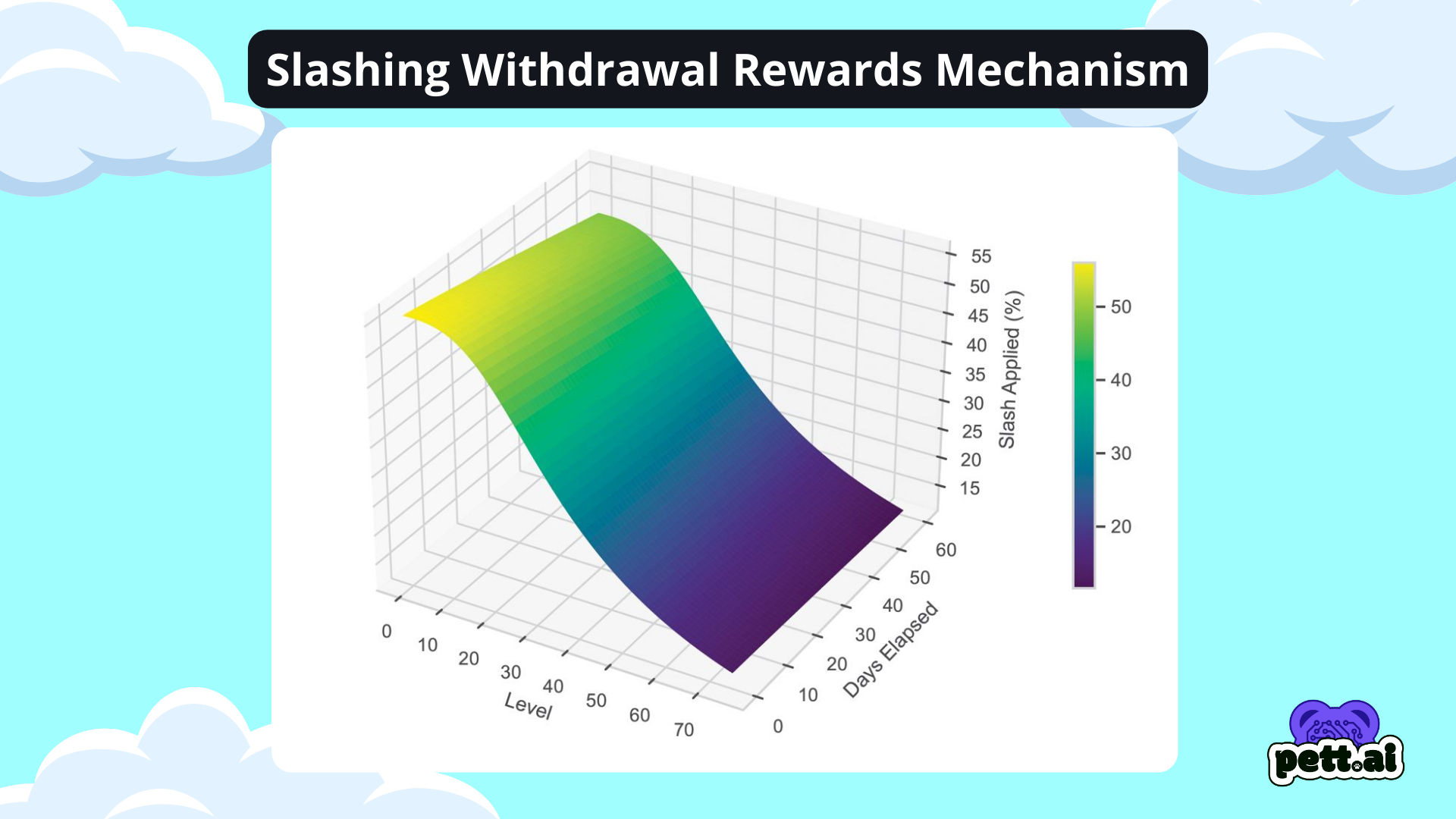
\- Be aware that in-game earned $AIP tokens are subject to a withdrawal slash function. The slash rate decreases based on your PettBro's level and the time elapsed since initiating a withdrawal. Higher levels and longer holding periods result in lower slash rates.
6\. Jump Queue Option:
\- If you want to expedite your withdrawal, you can choose the "Jump Queue" option. This feature allows you to prioritize your transaction for a faster processing time. Be aware that this may incur additional fees.
7\. Check Gas Fees:
\- Ensure you have sufficient ETH for gas fees, which are minimal on the Base network. Check the estimated fee when initiating a withdrawal.
8\. Complete the Withdrawal:
\- Once confirmed, the $AIP tokens will be transferred to your connected wallet.
#### Withdrawal Handling Rules
* **Dead pets with available withdrawals**
* If a pet dies while having **available withdrawals**, those withdrawals are **cleared daily**.
* You have until **12:00 AM (same day)** to **revive the pet**.
* If the pet is not revived by this time, the available withdrawals are **deleted**.
* **Refund of long-pending available withdrawals**
* Any withdrawal that remains **available (unqueued)** for **15 consecutive days** is **automatically refunded**.
* Once refunded, the withdrawal is **invalidated**, and the withdrawal process must be **started again**.
#### Withdrawal Constraints
**Eligibility**
* A pet **must be at least level 20** to request a withdrawal.
* Pets below level 20 **cannot initiate withdrawals** under any circumstance.
**Withdrawal Limits per Level**
The **maximum amount of $AIP per withdrawal transaction** is determined by the pet’s level:
* **Level 20** → up to **15,000 $AIP**
* **Level 35** → up to **30,000 $AIP**
* **Level 50** → up to **50,000 $AIP**
* **Level 75** → up to **75,000 $AIP**
> Limits apply **per transaction**, not per day or per account.
**Active Withdrawal Cap**
* Each pet can have **a maximum of 5 active withdrawals** at any given time.
* Once the limit is reached, **no additional withdrawal requests** can be created until one is completed, refunded, or deleted.
### Jump Queue
The **Jump Queue** system allows players to speed up their withdrawals by spending a **percentage of their $AIP amount** to skip a **percentage of the queue** ahead of them. Instead of waiting in line, players can choose to move up faster, ensuring quicker access to their funds while keeping the system fair and balanced.
{% hint style="info" %}
The **Jump Queue** feature has been introduced on February 25, 2025.
{% endhint %}
> [Dive deeper into the Jump Queue Section.](/tokenomics/deposits-and-withdrawals/jump-queue.md)
### **Slashing Function**
***
The Withdrawal Slash Function is designed to balance fairness & incentives taking two factors into consideration, elapsed time since initiating the withdrawal and the PettBro's level. The slash is only applied to tokens earned in-game. All $AIP tokens bought and deposited are exempt from any type of slash and can be withdrawn anytime.
{% hint style="info" %}
Withdrawals for $AIP tokens are enabled for all players level 15 or above.
{% endhint %}
The slash function is given by the following equation:
$$
f(d,l) = \left( \frac{700 - l^{1.1}}{\sqrt{\frac{d^3}{155.9} + 155.9}} \right) {d > 0}
$$
The 2D-algebraic function heavily scales down incurred tax for higher level users further decaying as time goes by.
{% hint style="success" %}
All ETH deposited in-game can be withdrawn anytime without incurring any slash.
{% endhint %}
### Slash Distribution
***
In order to foster a dynamic economy, the slashed tokens will follow a 50:50 distribution, with half of them being burned and the rest being returned to the PettBro on the leaderboard. The burn events will be tracked on-chain.
$$
\begin{align\*} \text{$AIP}&= \begin{cases} 50% \text{ : burned }\ 50% \text{ : leaderboard distribution } \end{cases} \end{align\*}
$$
Please revert to [Leaderboard](/overview/leaderboard.md) to find out more about the leaderboard distribution system.