> For the complete documentation index, see [llms.txt](https://docs.pett.ai/llms.txt). Markdown versions of documentation pages are available by appending `.md` to page URLs; this page is available as [Markdown](https://docs.pett.ai/mobile-app/install-app-how-to.md).
# Install App: How-to
### 🟣 How to Install the Pett.ai Mobile App (PWA)
The **Pett.ai Mobile App** is currently available as a **Progressive Web App (PWA)** – meaning it runs smoothly right from your browser, without needing to download it from the App Store or Google Play. As long as you're connected to the internet, you can access all features from **any device**.
To unlock a smoother and more immersive experience, we recommend **adding Pett.ai to your home screen**.
***
#### ✅ Why Add to Home Screen?
* Instant 1-tap access (like a native app)
* Full-screen experience
* Faster load times
* Keeps your PettBro always within reach
***
### 📱 iOS (iPhone / iPad) Setup
1. Open **Safari**
2. Navigate to [app.pett.ai](https://app.pett.ai/)
3. Tap the **Share** button (📤 at the bottom center)
4. Scroll and tap **“Add to Home Screen”**
5. Rename the app to anything you like — maybe even your **PettBro’s name!**
6. Tap **“Add”** and you’re done!
Now you have instant access from your Home Screen.
***
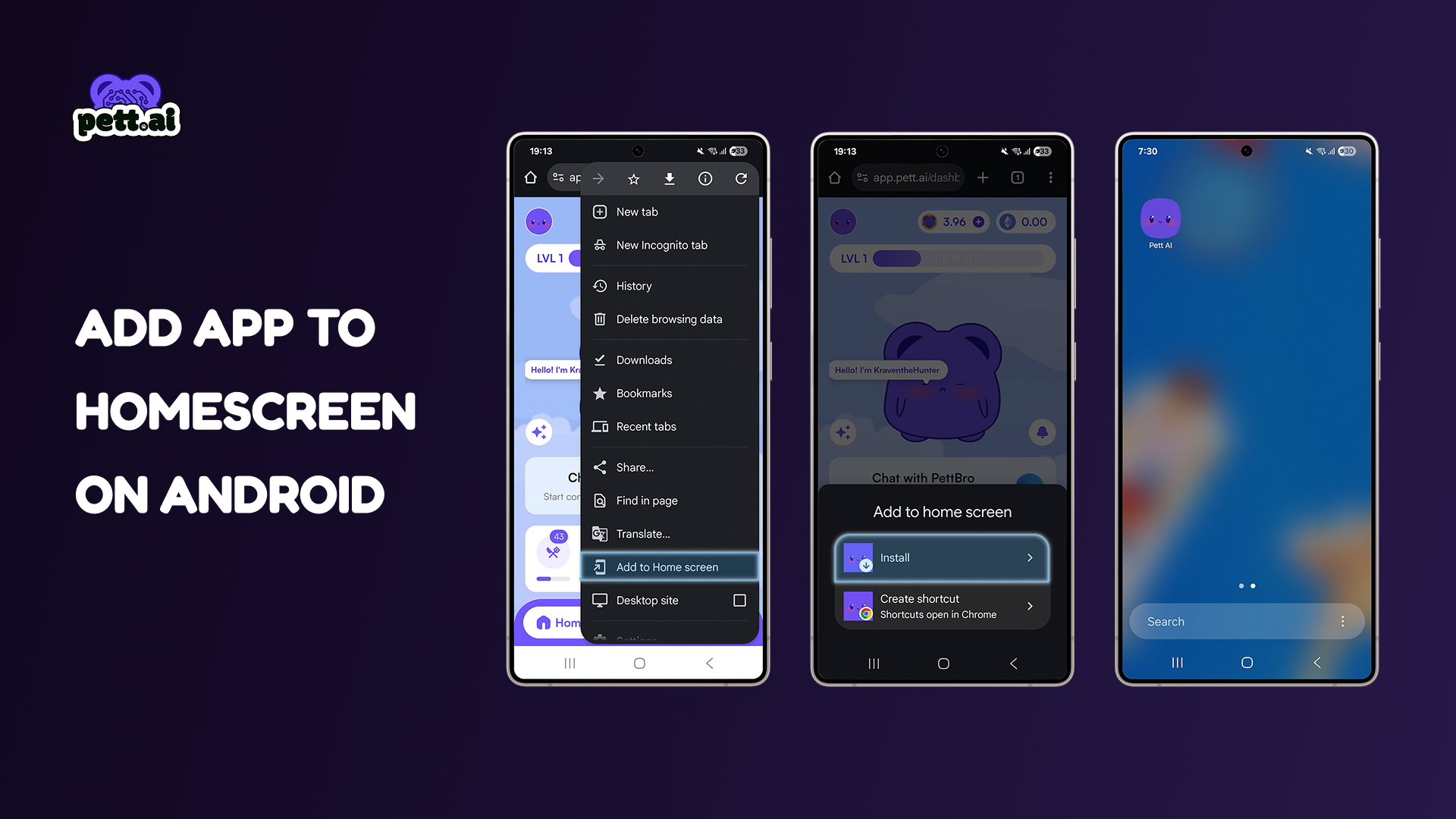
### 🤖 Android Setup
> Most Android browsers support PWAs, but we recommend **Chrome** for best results.
1. Open **Chrome**
2. Go to [app.pett.ai](https://app.pett.ai/)
3. You’ll see a prompt:\
**“Add Pett.ai to Home screen”** – tap it
* *OR* tap the **3-dot menu (⋮)** and choose **“Add to Home screen”**
4. Customize the app name if you want
5. Tap **“Add”** → then **“Add Automatically”** or drag it where you want on your screen
You now have the full Pett.ai experience as if it were a native app!
***
### 🧠 Tips & Notes
* **No updates needed** – the PWA always stays current with the latest version
* Works best in **Safari (iOS)** and **Chrome (Android)**
* If you ever delete it, just repeat the steps above to re-add it
### 📽️ Need a Visual Guide?
If you're more of a visual learner, we’ve got you covered.
Check out the GIF below to see exactly how to install the Pett.ai App to your home screen — step-by-step, no guesswork.